Practice your fantasy football draft before it counts. See how RedZoneHQ's mock draft simulator works and how to use it in your draft preparations
Draft night moves fast. Picks come in every 60 to 90 seconds. There is no time to second-guess your picks.
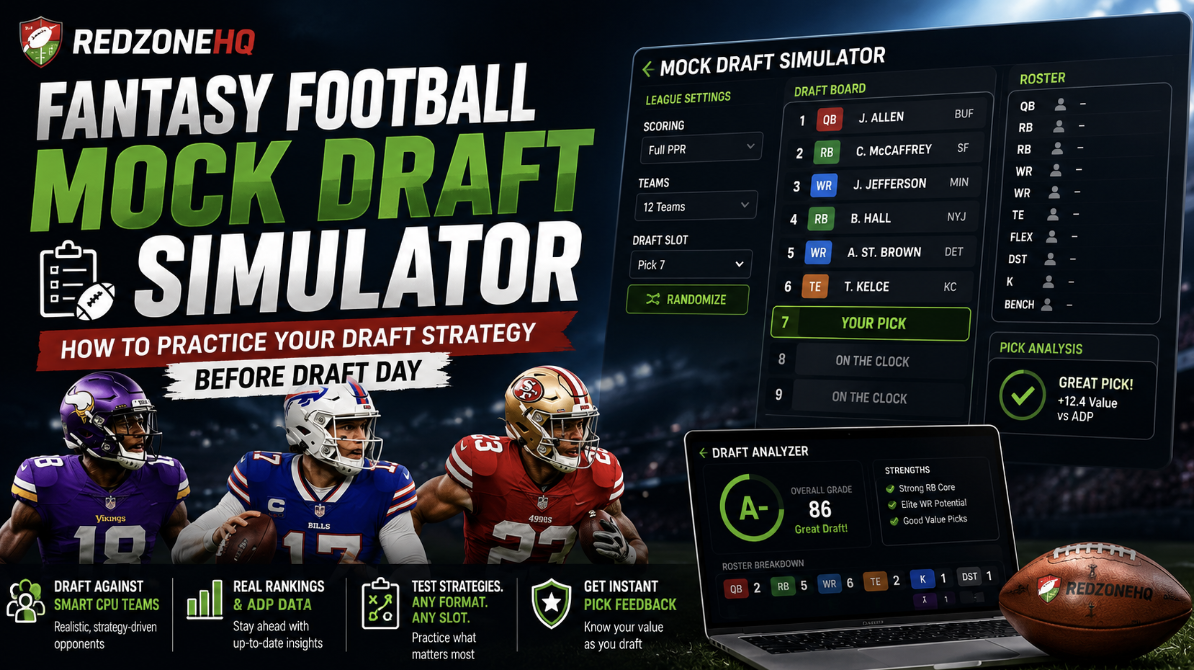
The RedZoneHQ Mock Draft Simulator helps fantasy managers by rehearsing ahead of draft week. The all-in-one mock draft tool allows fantasy managers to practice draft builds around real rankings, ADP data, and CPU opponents that behave like actual league players.
Why mock firstMock drafting is the closest thing to being on the clock without any of the consequences. Rehearse the room, feel the runs, and walk into your real draft with a plan you have already stress-tested.
What Is the RedZoneHQ Mock Draft Simulator?
The mock draft simulator is a solo practice tool. There are no other players to compete against. Instead, it runs a full snake draft against CPU-controlled teams. It lets you draft and practice in any slot, for any league size.
CPU-controlled teams draft using rankings and ADP while creating realistic draft scenarios.
Each mock draft unfolds differently, simulating a more realistic drafting experience.
How Does the Mock Draft Tool Work?
Here is a how-to guide on operating the RedZoneHQ fantasy football mock draft tool:
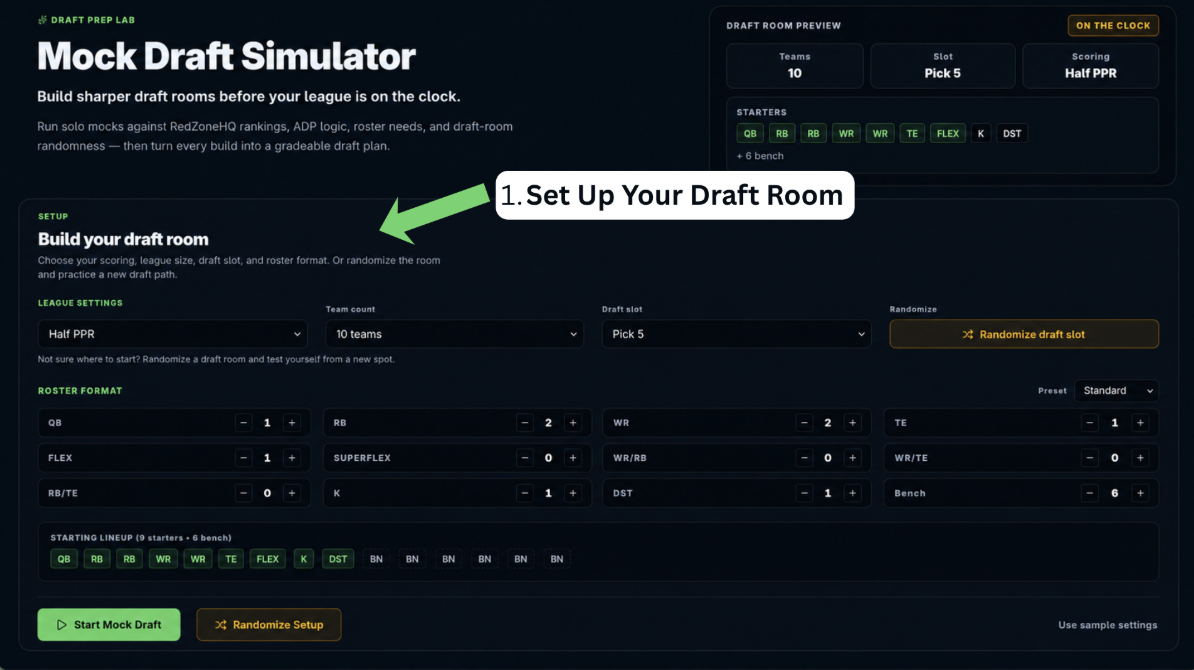
Step 1. Set Up Your Draft Room
Firstly, configure the room to match the league you are prepping for:
Scoring format: Standard, Half PPR, Full PPR, or "My League" if you've connected an existing league
Team count: 8, 10, 12, or 14 teams
Draft slot: Pick 1 through Pick 10; choose manually or generate with the 'Randomize' option
Randomizing the slot lets you test your strategy from a position you don't usually draft from.
Mock Draft Setup at a Glance
Setting
What It Controls
Why It Matters
Scoring format
Standard, Half PPR, Full PPR, or your synced league scoring
Reception value flips the WR/RB/TE board. Match your real league or the mock reps do not translate.
Team count
8, 10, 12, or 14 teams
Fewer teams inflates depth and lets you reach; deeper leagues force earlier runs at QB, TE, and even DST.
Draft slot
Pick 1 through the final slot
Turns dictate strategy. The plan at 1.01 is nothing like the plan at 1.12.
Roster format
Standard, 3 WR, Superflex, 2 QB, No K/DST, or custom
Format changes positional scarcity. QB rises fast in Superflex; TE gets pushed up in TE Premium.
Randomized draft position
Assigns a random slot before the room opens
Simulates the real uncertainty of draft day and forces you to be ready from anywhere on the board.
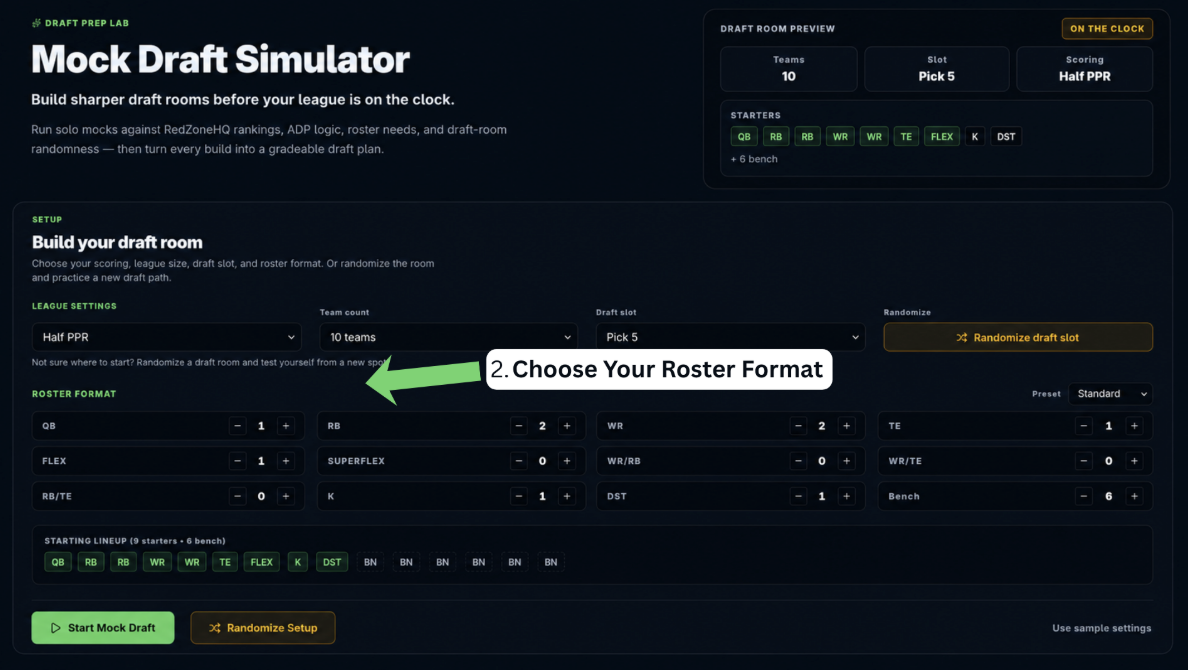
Step 2. Choose Your Roster Format
Secondly, you construct your roster. It changes what is valuable at every point in a draft.
Preset formats: Standard, 3 WR, Superflex, 2 QB, No K/DST
Custom builder: set exact starting slots, including QB, RB, WR, TE, FLEX, Superflex, WR/RB, WR/TE, RB/TE, K, and DST, plus bench size
If your home league runs a Superflex format or skips kickers and defenses entirely, matching that setup here means the mock actually reflects the draft you'll face.
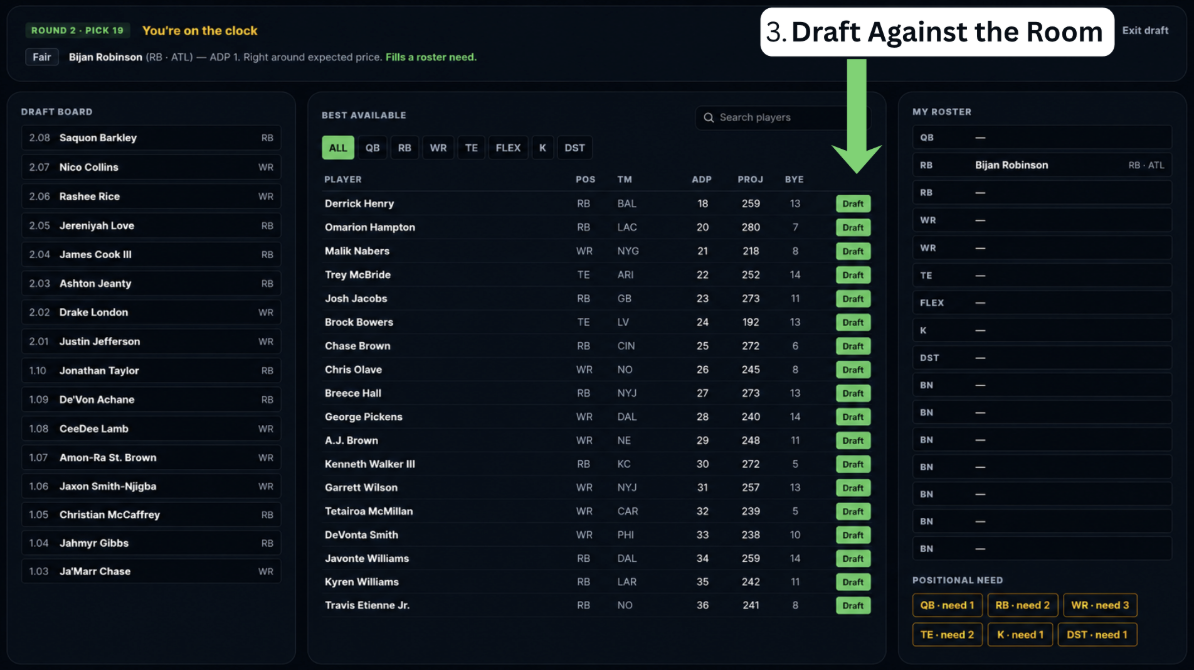
Step 3. Draft Against the Room
Once the room is set, the draft plays out as a full-stakes draft. CPU-controlled teams make selections based on the simulator's draft logic. This leads to positional runs, tight end scarcity, and late-round quarterback value showing up the way they would in a live draft.
As the draft progresses, you can evaluate how your roster is shaping up and identify opportunities to adjust your strategy before draft day. That instant feedback is useful for adjusting instincts on the fly instead of waiting until after the draft to figure out where a pick fell short.
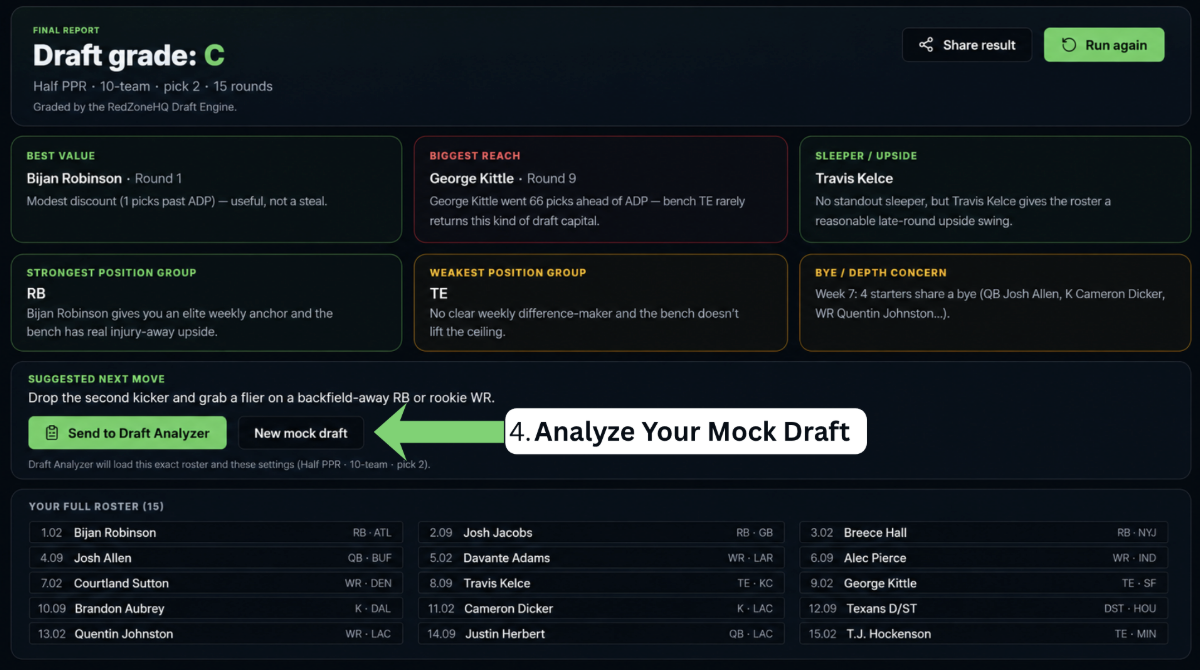
Step 4. Analyze Your Mock Draft
Once a mock draft wraps, send the resulting roster to the RedZoneHQ Draft Analyzer for a complete grade and breakdown. This turns a practice run into something you can evaluate.
RedZoneHQ workflowMock Draft → Draft Analyzer → My Teams Command Center. Rehearse the room in the simulator, grade the finished roster in Draft Analyzer, then run your real synced leagues from My Teams once draft night is done.
Who Should Use a Fantasy Football Mock Draft Simulator?
This tool fits a wide range of managers:
Manager Type
Why It Helps
Beginners
Learn pick timing, positional value, and the feel of a live board without any real-league downside.
Experienced managers
Stress-test a specific strategy — Zero RB, Hero RB, late-round QB — before committing on draft night.
Superflex / custom format players
Feel how sharply QB value shifts, and see when the second-QB run actually starts in your format.
League commissioners
Give newer managers a low-pressure room to practice in and answer questions before the real draft.
Managers testing unfamiliar draft slots
Pick 1 and Pick 12 are two different drafts. Run both so no slot on draft day catches you cold.
Key Benefits for Fantasy Football Managers
Running mocks ahead of a real draft offers several solid advantages:
Practice reacting to positional runs without losing anything if you make a mistake on one
Compare how ADP and player value shift between Standard, Half PPR, and Full PPR scoring.
Test roster builds you haven't drafted before, like Superflex or a heavy WR format.
Build familiarity with a draft slot you rarely pick from
Get immediate feedback on pick value instead of guessing after the fact
Best Times to Use the Mock Draft Simulator
Not every mock has to be a full dress rehearsal. The reps that pay off most are the ones timed to specific moments in the pre-season:
When
What to Focus On
Before draft day
Baseline reps to lock in your Round 1–6 plan and identify your must-have targets.
After a rankings update
Re-run a mock to see how ADP and value shift so your cheat sheet stays current.
When testing a new draft slot
Randomize the pick, then run the room from a spot you rarely draft from.
Practicing Superflex or custom formats
Feel where the QB run breaks and how flex-heavy rosters actually fill in.
After major injury or news movement
See how a shifted board changes value and identify the new tier breaks in real time.
Practical Use Cases and Examples
Here are a few examples to show how this plays out in practice:
Testing draft slots. If you always pick in the middle rounds, run a mock from Pick 1, then another from Pick 10, and see how player availability and strategy shift at each extreme.
Trying a new format. Someone joining a Superflex league for the first time sets up a Superflex roster in the simulator to understand how quarterback value changes compared to a standard league.
Prepping the night before. A manager uses the "Randomize" option to generate an unknown draft slot, simulating the uncertainty of not knowing their real position until draft day.
Closing the loop. After running a mock, a manager sends the resulting roster to the Draft Analyzer to see how it grades, then adjusts their draft plan based on where the mock roster came up short.
Why Mock Drafting Matters for Draft Preparation
Reading rankings and studying ADP is good, but nothing beats practice. Mock drafting tests your research in practical scenarios that feel like a real draft.
Running through positional runs, reach decisions, and roster construction multiple times builds your instincts, which are hard to develop from static rankings alone.
Grading a completed roster with the Draft Analyzer then shows whether the strategy actually held up. Every mock draft gives you another opportunity to recognize positional runs, understand player value, and refine your decision-making before your real league begins.
Frequently Asked Questions
Is the RedZoneHQ Mock Draft Simulator free to use?
Yes, you can use the mock draft tool without joining a live lobby.
Do I draft against real people or CPU teams?
The simulator runs a full snake draft against CPU-controlled teams. These teams draft using rankings, ADP, and roster-construction logic, so their behavior mirrors what you'd see from real league mates rather than being totally random.
Can I customize the roster format to match my real league?
Yes. You can choose from preset formats or build a custom roster with your own starting slots and bench size.
What happens after I finish a mock draft?
After completing the draft, you can send the results straight to the RedZoneHQ Draft Analyzer for a full grade and breakdown.
Conclusion
All in all, a mock draft simulator removes a lot of the guesswork that comes with facing a live draft room. The RedZoneHQ Mock Draft Simulator is a valuable tool for fantasy managers who want to test strategies, build confidence, and prepare more effectively before draft day.
Start your first mockOpen the RedZoneHQ Mock Draft Simulator, run a full room in your real league's format, then send the finished roster to the Draft Analyzer for a grade. Two reps like that and you will walk into draft day with a plan, not a hunch.